Follow along with the M+, M−, MR and MC keys on our Standard Calculator with Memory.
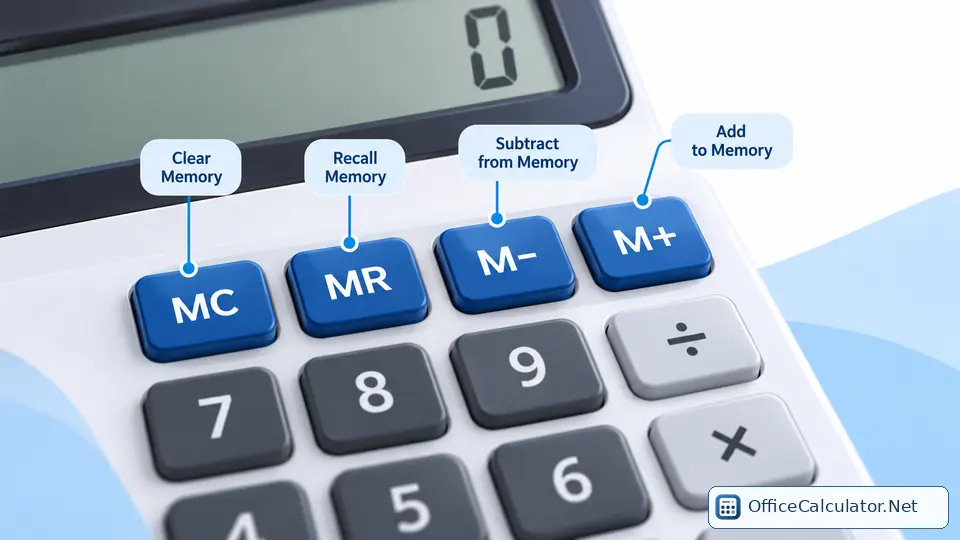
Calculator memory button reference
| Key | Typical meaning | Typical action |
|---|---|---|
| MC | Memory Clear | Reset memory to zero |
| MR | Memory Recall | Bring memory value to display |
| MS | Memory Store | Replace memory with displayed value |
| M+ | Memory Plus | Add displayed value to memory |
| M− | Memory Minus | Subtract displayed value from memory |
| MRC | Memory Recall/Clear | Combined recall/clear on some models |
Labels can vary. RM may be used instead of MR, and CM instead of MC on some calculators.
How memory differs from normal arithmetic
The normal + and − keys change the expression you are calculating. Memory keys change a second stored value. This lets you finish one calculation, save or accumulate its result in memory, clear the display, calculate something else, then recall the stored number when needed.
Running-total example with M+
To total 125.40, 89.95 and 42.10 without building one long expression: press MC, enter 125.40 and M+, enter 89.95 and M+, enter 42.10 and M+, then press MR. The memory total is 257.45.
Using M− for deductions
Suppose memory contains 500 and you need to deduct 75 and 20. Enter 75 and press M−, then enter 20 and press M−. Memory is now 405. Press MR to recall it.
What the M indicator means
Many calculators show a small M icon when memory contains a value. On the Office Calculator homepage, an M indicator appears while the memory value is non-zero. Pressing MC clears the stored value and removes that indicator.
Memory versus history or calculation tape
Memory is fast but usually stores only one value. A calculator history or tape records multiple completed calculations, making it easier to audit what happened. Use memory for a temporary number; use history when you want a visible sequence.
Frequently asked questions
What does M stand for on a calculator?
M refers to calculator memory, a stored value separate from the current display.
Does MC clear the whole calculator?
No. MC normally clears only the memory register. C or AC clears the current calculation/display.
Can memory hold a negative number?
Yes on many calculators. M− can reduce memory below zero.
Is MRC the same as MR?
Not exactly. MRC is a combined memory recall/clear key on some models, while MR only recalls memory.
Open the matching OfficeCalculator.Net tool and test the examples with your own values.
Practice the memory examples using the Standard Calculator with Memory.