Try the memory keys as you follow this explanation using our Standard Calculator with Memory.
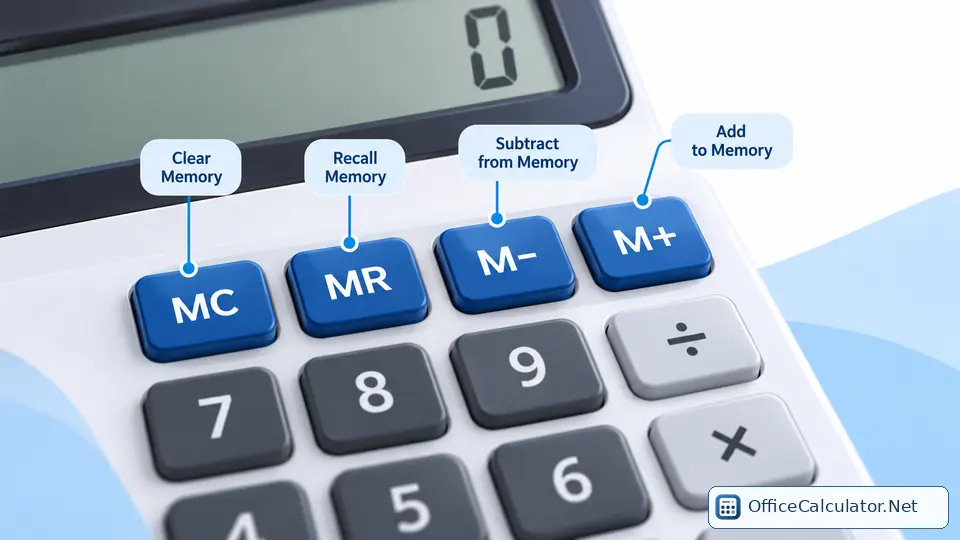
What does M+ mean on a calculator?
M+ stands for Memory Plus. A calculator can keep one separate memory value while you continue doing other calculations. M+ adds the current displayed number to that hidden memory total.
If memory starts at 0, entering 25 and pressing M+ stores 25. Later, if the display shows 10 and you press M+ again, memory becomes 35.
A simple M+ example
Suppose you are totaling three expenses: 18.50, 27.25 and 12.00. Calculate or enter each amount and press M+ after each one. The memory becomes 18.50, then 45.75, then 57.75. Press MR to recall the 57.75 total.
This is useful when you want a running total without writing intermediate numbers down or rebuilding one long expression.
What do M−, MR and MC do?
| Button | Meaning | What it does |
|---|---|---|
| M+ | Memory Plus | Adds the displayed value to memory |
| M− | Memory Minus | Subtracts the displayed value from memory |
| MR | Memory Recall | Shows the number stored in memory |
| MC | Memory Clear | Clears the stored memory value |
| MRC | Memory Recall/Clear | A combined key on some calculators; behavior varies by model |
How to use M+ on OfficeCalculator.Net
The main Office Calculator has separate MC, MR, M+ and M− buttons. Try this: press MC, calculate 40, press M+, calculate 15, press M+, then press MR. The recalled memory should be 55.
The small M indicator appears while a non-zero value is stored in memory. Memory is part of the current calculator session; clearing memory with MC returns it to zero.
When is M+ useful?
- Adding receipt or invoice amounts one by one.
- Keeping a subtotal while working out a discount or tax separately.
- Adding several intermediate results from different calculations.
- Keeping one reference amount available while you continue calculating.
For calculations that need a visible audit trail, the Office Calculator also keeps a calculation tape/history, which can be easier to review than one hidden memory value.
Common M+ mistakes
- Forgetting old memory: press MC before starting a new memory total.
- Expecting M+ to replace memory: M+ adds to memory. A separate MS key, where available, replaces the stored value.
- Confusing M+ with the normal + key: + builds an arithmetic expression; M+ changes the separate memory register.
- Assuming every MRC key behaves identically: combined memory keys can differ by calculator model.
Frequently asked questions
Does M+ clear the calculator display?
Usually no. M+ changes the memory value; the displayed result remains available. Exact behavior can vary by calculator.
Does M+ replace the number already in memory?
No. M+ adds the displayed number to the existing memory value. If you need to start over, use MC first.
What is the difference between M+ and MR?
M+ adds the current display to memory. MR recalls the value already stored in memory.
What is the difference between M+ and M−?
M+ adds the displayed number to memory; M− subtracts it from memory.
Open the matching OfficeCalculator.Net tool and test the examples with your own values.
Practice saving and recalling values with the Standard Calculator with Memory.